Computer vision turns ordinary court cameras into a coach and statistician: real-time ball tracking, shot analysis, speed in km/h, automatic scoring and highlights.
Not just ball analytics but the entire player journey: booking, court entry, a match with automatic scoring, a review in the app — and a club that runs without reception queues or downtime when the connection drops.
01 · BOOKING
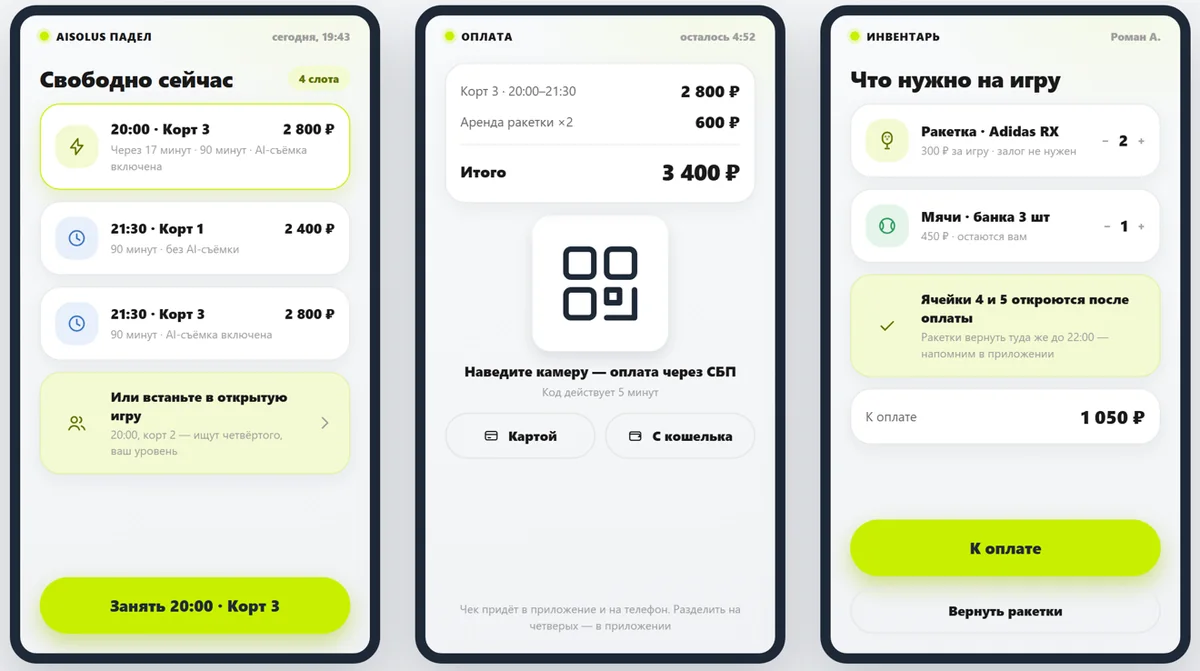
Booking, payment and equipment — at a court-side kiosk
Walk-in players see today's free slots, pay and pick up rackets from a locker without going to reception.
Free courts and open games nearby
Pay via SBP, by card or from a wallet
Equipment rental and return with no staff
02 · ENTRY
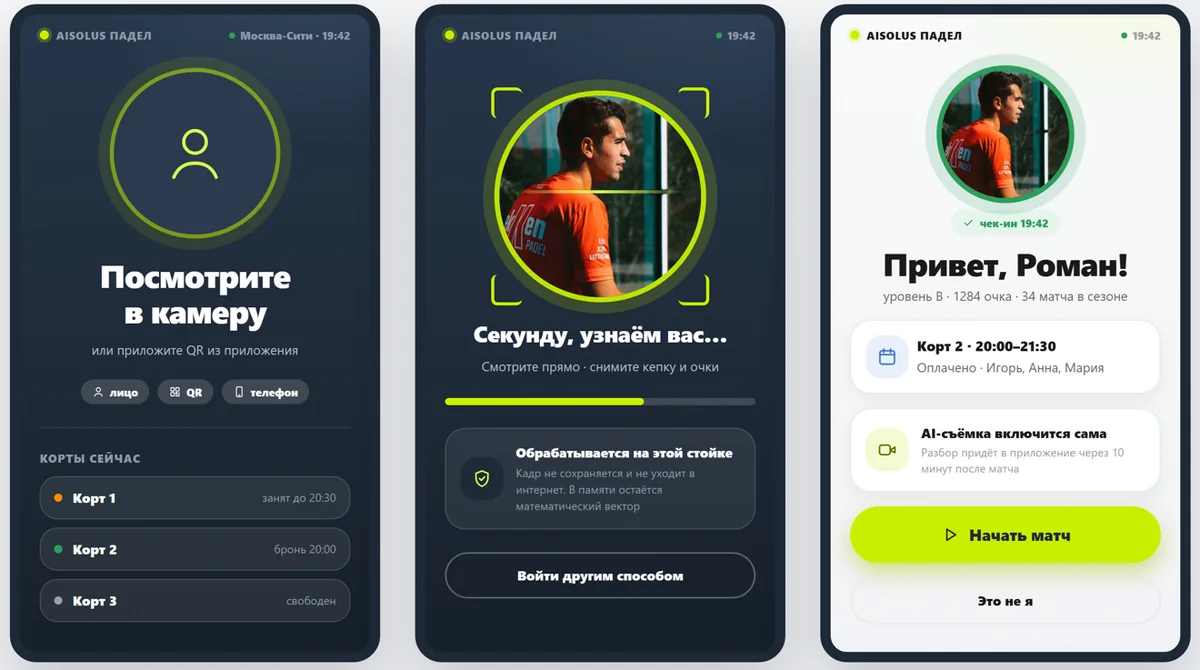
Players enter the court by face or QR
The terminal recognizes the player, shows their booking and line-up, and starts AI recording automatically. Recognition runs on the kiosk: the frame is never stored or sent to the internet.
Entry by face, app QR or phone number
Court occupancy right on the screen
Match recording starts by itself, no buttons
03 · MATCH
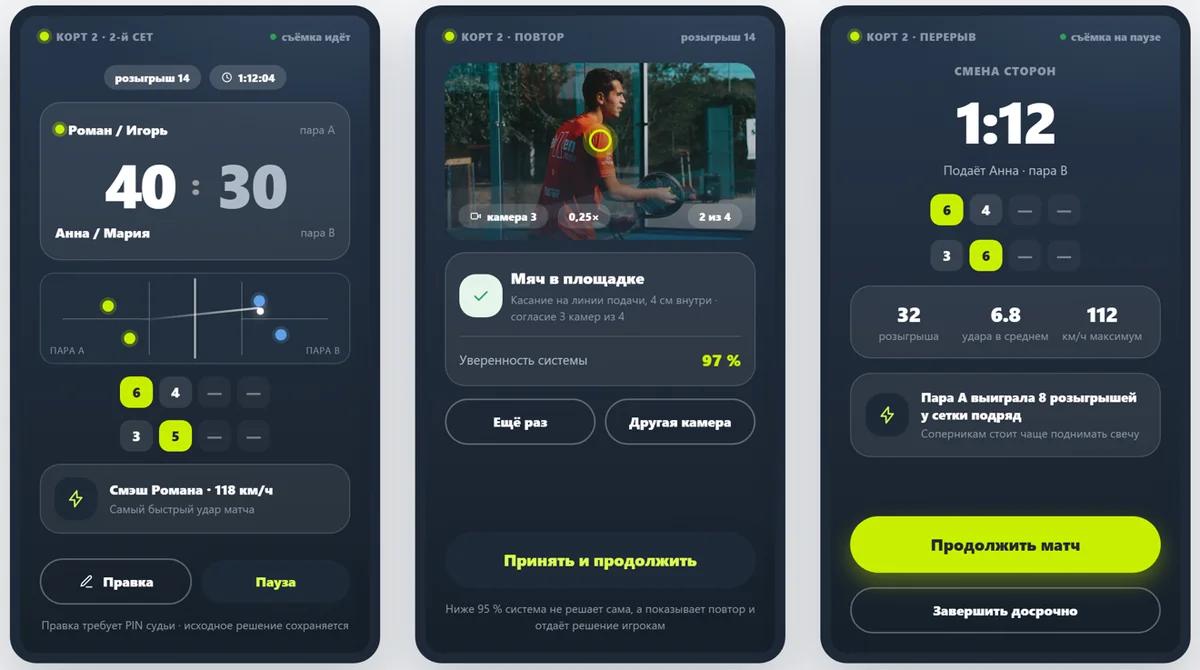
Score, replay and stats — right on the court
Large live score and rally diagram, multi-camera replay of disputed points, stats and game tips during breaks.
Below 95% confidence the system does not decide — it shows a replay
Score corrections only by referee PIN; the original call is kept
Fastest shot of the match in km/h
04 · REVIEW
Review and highlights — in the app in 10 minutes
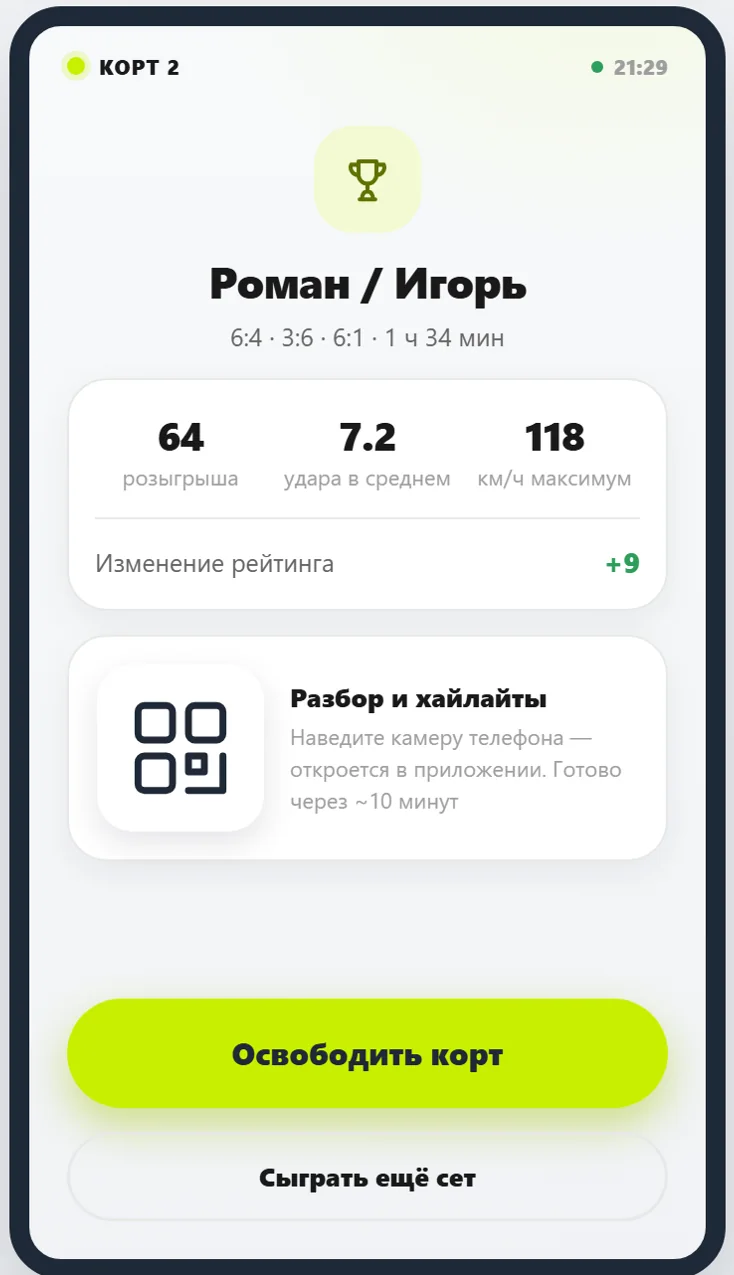
After the match the terminal shows the result and a QR code: the player opens the review in the app, and the court is free for the next booking right away.
Rallies, shots and top ball speed
Player rating change after the match
Highlights and heat map — in the personal account
05 · CLUB
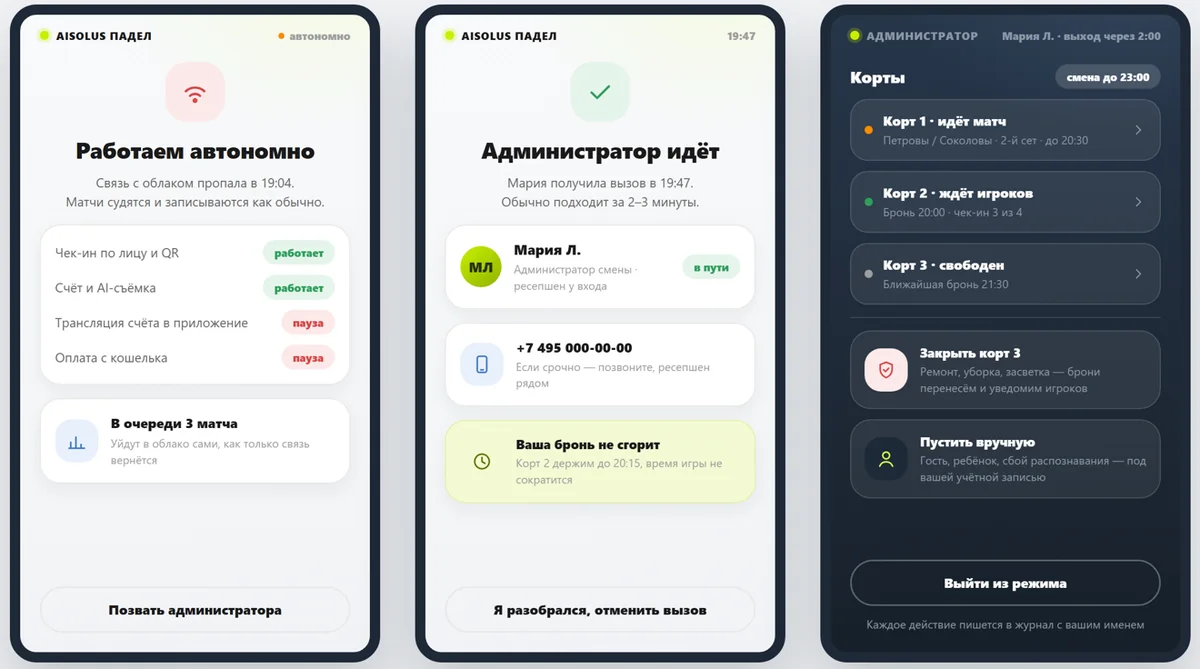
The club works even offline
If the cloud connection drops, matches are still scored and recorded, and results sync automatically once it's back. Staff manage courts right from the kiosk.
Standalone court server operation
Call an administrator from the kiosk
Admin mode by PIN with a named activity log
1–4cameras per court — no racket sensors, no ball chips
8shot types recognized by the system
~10 minfrom match end to review in the app
0referees needed for 15-30-40 scoring, games and sets
Screens — an interactive prototype of the AIS5 PadelVision interface.
For every role in the club
Everyone sees only what's theirs: players — games and reviews, coaches — students, administrators — the club and revenue.
FEATURES
Court booking, payment and pass in the app
Opponent search and open matches
Highlights, heat map and season stats
Rating, leagues and achievements
Club tournaments
EFFECT FOR THE CLUB
Players come back to “defend their rating”
Highlights shared on social media — free marketing
The full game history stays with the club
FEATURES
Coach dashboard and group sessions
Game reviews of their students
Reports for junior players' parents
Coach showcase where players find a coach
EFFECT FOR THE CLUB
Student progress measured in numbers
More private lessons
Junior programs with transparent reporting
FEATURES
Club dashboard: courts, bookings and utilization
Prices, rates, promotions and Happy Hours
Club tournaments and brackets
Camera and equipment status
EFFECT FOR THE CLUB
Paid advanced analytics plans
Advertising and sponsor slots on screens and in highlights
Turnkey tournament module
FEATURES
Referee console: score entry and correction
Disputed point: flag and replay, people make the call
Live court feed and replays
Scoreboard on the court-side screen
EFFECT FOR THE CLUB
Tournaments without score disputes
Court streaming for spectators and parents
Every correction is logged by name
✓ Video is processed on the club's server and never goes to the cloud — compliant with Russian Federal Law No. 152-FZ
Equipping a new or existing club
Standard cameras on the court and a GPU server in the club. No racket sensors, no ball chips.
New club
Cameras and server built into the court design
Court-side terminals from day one
Booking, payment and entry in one system
Scaling: court → club → club network
Existing club
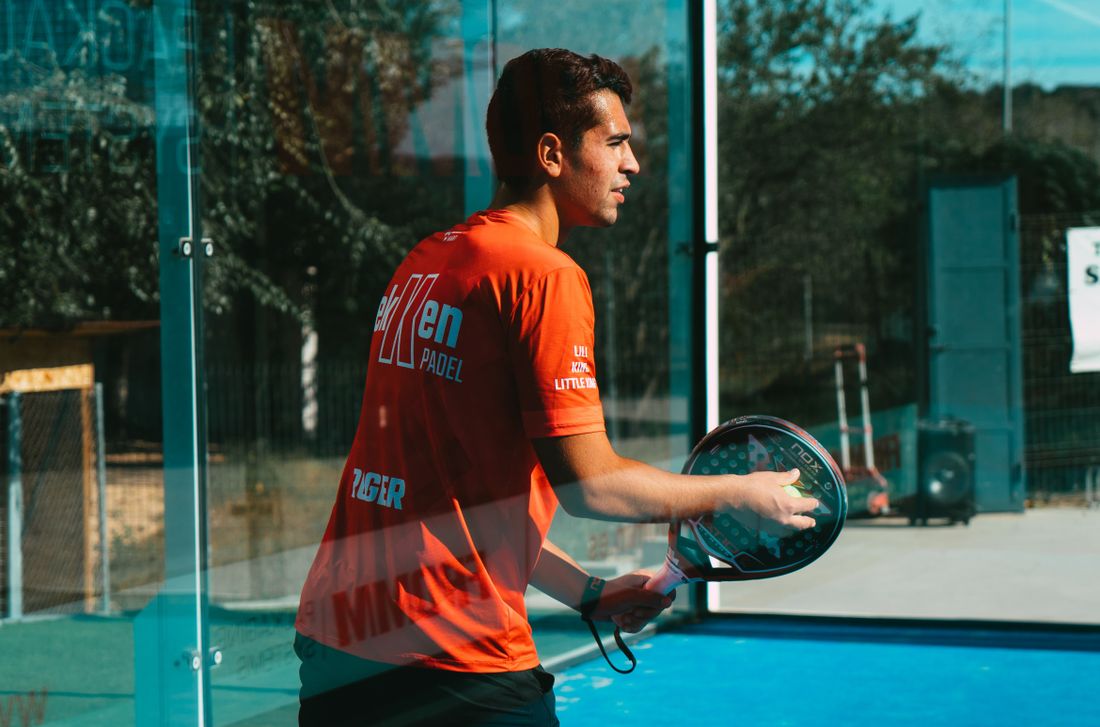
Cameras mount on the court's corner posts
No court rebuild or equipment replacement
Start with one court and expand as it pays off
Works when the internet is down
Player retention
Ratings, leagues and achievements keep players at the club.
New revenue
Paid analytics, sponsor slots and tournaments.
Lighter reception load
Booking, payment and equipment — at a court-side kiosk.
The TrackNetV3 neural network finds the ball even at high speed and with motion blur; a Kalman filter builds the trajectory and detects shots and bounces.
Shot classification
8 shot types based on player pose and ball trajectory: forehand, backhand, smash, volley, lob, serve, bandeja, vibora — with confidence scores.
Speed in km/h
After court calibration (4 clicks on the corners), the system converts pixels to meters and calculates the true speed of every shot.
Heat maps
Where the ball travels most and how players move — a visual map of court zones for tactical analysis.
Auto-highlights
The system automatically cuts the best rallies and smashes into short clips — ready to share right after the match.
Automatic match scoring
Full 15-30-40 scoring, games, sets and tie-break — no referee needed, live score on screen.
Replay and stats
Rally timeline, JSON/CSV export, replay of any moment — for coaches and progress tracking.
Shot audio fusion
A microphone picks up the sound of the ball strike (FFT 1–8 kHz) and pinpoints the moment of contact — more accurately than video alone.
Court calibration
Homography from the 4 court corners: serve zones, “out” calls, distances and speeds — mapping video to real court geometry.
How it works
Standard court cameras + a GPU server. No racket sensors, no chips in the ball.
1
Cameras capture the court
1–4 cameras around the perimeter. Frames are streamed to the server via WebSocket.
2
GPU recognition
TrackNetV3 finds the ball; RTMPose+YOLOX track the poses of up to 3 players.
3
Real-time analytics
Shot type, speed, zones, score — all computed on the fly and overlaid on the video.
4
Results for players
Scoreboard, highlights and match stats — right after the game.
Modes and drills
From single-shot practice to a full match with automatic scoring.
🎾
Match (full mode)
Automatic 15-30-40 scoring, HUD, heat map, replay, highlights and audio.
🧱
Wall rally
A series of wall ↔ racket bounces — control and rhythm training.
➡️
Forehand
Forehand count with technique and speed assessment.
⬅️
Backhand
Backhand count with technique analysis.
🚀
Serve
Serves by court zone (after calibration) + speed.
✈️
Volley
Shots taken out of the air before the bounce — net play practice.
Technology
An open computer vision stack under Apache-2.0 and MIT licenses — no vendor lock-in.
TrackNetV3
Dedicated ball detector over 8 frames + gap inpainting (MIT).
RTMPose + YOLOX
Poses of up to 3 players, 17 keypoints, on GPU (Apache-2.0).
Kalman + homography
Trajectory smoothing and pixel-to-court-meter conversion.
Edge / GPU
Discrete server GPU (RTX). Everything is processed at the court, no cloud.
Get in touch with us
We'll show the system in action on your court and spec the equipment for your club.